Pokepay logo
  • Overview
  • Get started
  • Features
  • Pricing
  • Case studies
  • Columns
  • View all
  • Try DemoHaving trouble using electronic money? Users support page
  • Back
  • Service

    Overview
    Get Started
    Features
    Usage
    Case Studies
    Pricing
    Document Library

    Latest Info

    Pokepay Column
    Newsletter
    YouTubeexternal link icon
    Instagramexternal link icon

    Contact Us

    Document Request
    Contact Us

    For e-money issuers

    Helpexternal link icon
    FAQ

    For introduction support

    Partner Program

    Would you like to support Pokepay in your city?

    Pokepay Enterprise

    Enterprise

    Learn more about large- scale business and regional currency here.

Try Demo

Service

Overview
Get Started
Features
Usage
Case Studies
Pricing
Document Library

Latest Info

Pokepay Column
Newsletter
YouTubeexternal link icon
Instagramexternal link icon

Contact Us

Document Request
Contact Us

For e-money issuers

Helpexternal link icon
FAQ

For introduction support

Partner Program

Would you like to support Pokepay in your city?

Pokepay Enterprise

Enterprise

Learn more about large- scale business and regional currency here.

Having trouble using electronic money? Users support page
close document request dialog icon

Document Request

An easy to understand guide to Pokepay (For shops)

cover for Service Introduction Material of Pokepay
document request iconView document
dividing line for Pokepay document requestAbout Partner Program
Pokepay enterprise logo
Learn more about local currency and large-scale business here.
Enhance your business with embedded finance. Contact us for more information or send a document request.
Request DocumentContact Us
‌
‌‌
‌
‌
‌
‌
‌
‌
‌‌‌
‌
‌
Pokepay logo
info icon for Cashless Columns

Media that makes business easy.

Pokepay Column
mail icon for Pokepay newsletter

Get the latest information on Pokepay

Subscribe to Newsletter

Service

Overview
Get Started
Features
Usage
Case Studies
Pricing
Document Library

Latest Info

Pokepay Column
Newsletter
YouTubeexternal link icon
Instagramexternal link icon

Contact Us

Document Request
Contact Us

For e-money issuers

Helpexternal link icon
FAQ

For introduction support

Partner Program

Would you like to support Pokepay in your city?

Pokepay Enterprise

Enterprise

Learn more about large- scale business and regional currency here.

SGS ios certification icon

認証番号 JP21/080679

globe icon for language selectEnglish

Company

Privacy Policy

Terms & Conditions

Specific Commercial Transactions Act

Copyright ©️ Pocket Change Inc. All Rights Reserved.

ver: 07f20791-20260520120637
close document request dialog icon

Document Request

An easy to understand guide to Pokepay (For shops)

cover for Service Introduction Material of Pokepay
document request iconView document
dividing line for Pokepay document requestAbout Partner Program
Pokepay enterprise logo
Learn more about local currency and large-scale business here.
Enhance your business with embedded finance. Contact us for more information or send a document request.
Request DocumentContact Us
icon of Pokepay creator app for shops

Pokepay for shops

Try the demo for free

TryDemo
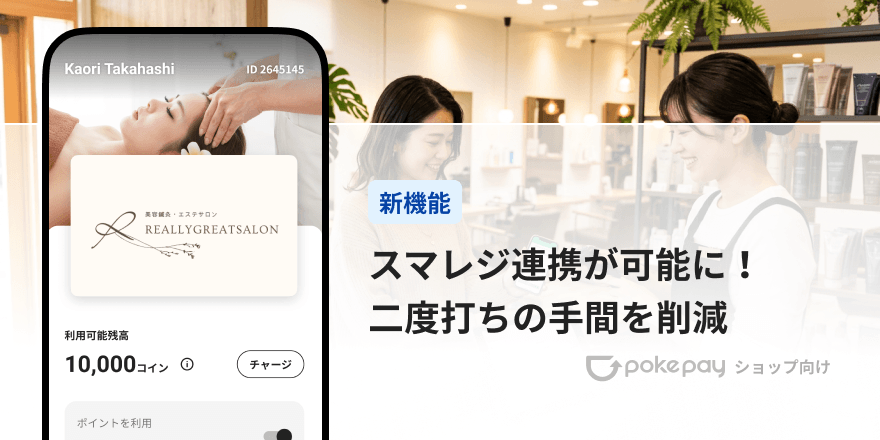
Pokepay(ショップ向け)スマレジ連携で会計をスマートに!二重入力をなくす「スマレジ連携機能」のご紹介
#新機能
#活用方法
#ニュース

2026-05-21

Pokepay(ショップ向け)スマレジ連携で会計をスマートに!二重入力をなくす「スマレジ連携機能」のご紹介

Pokepayをご利用いただいている皆さまに、便利な新機能のご紹介です。

copy link Icon

POSレジと自動連動で効率化と金額入力ミスゼロを実現

今回、高機能クラウドPOSレジ「スマレジ」と連動し、会計時の二重入力を解消できる「スマレジ連携機能」が追加されました。

Pokepay (ショップ向け) のダウンロードがまだの方はこちら。

スマレジ連携機能について

通常、お店独自のオリジナルPayを店頭で運用する際、POSレジで算出した会計額をPokepayアプリに手入力する「二重入力」の手間が発生していました。
これは混雑時のレジ渋滞や、スタッフの誤入力による金額ミスの原因となります。

新機能の「スマレジ連携機能」は、クラウドPOSレジ「スマレジ」とPokepayアプリをシステム連動させることで、この課題を解決します。
すでに店舗でスマレジを利用している事業者様や、これから導入を検討している事業者様に最適な機能です。

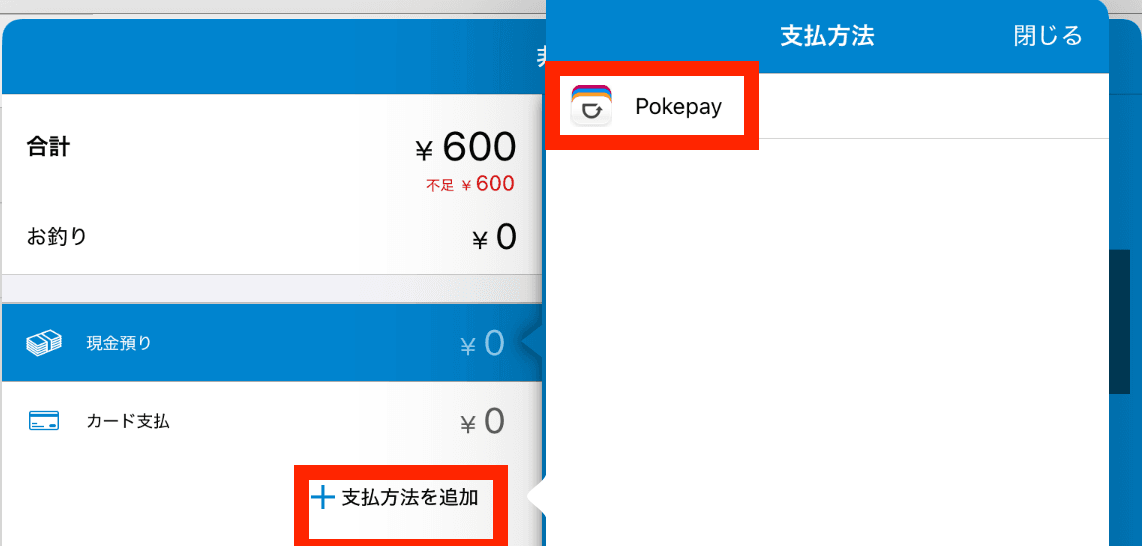
連携をオンにすると、他のQR決済と同様に、スマレジ上の決済手段「その他」にPokepayを追加することができます。
選択すると、同じタブレットにインストールしたPokepayが起動し、QRのスキャン画面まで自動で進んでくれます。
QRの読み取り後は、スマレジ側に戻り、会計が完了します。
スタッフはスマレジ側の操作だけで取引を完結できるため、二重入力の手間やミスは完全にゼロになります。
スクリーンショット 2026-05-21 15.40.49.png

「スマレジ連携機能」の活用例

1. ピークタイムのレジ渋滞を緩和する
会計時に自動でアプリが切り替わり、金額も自動で引き継がれるため、1人あたりの会計時間を大幅に短縮できます。
ランチタイムや週末などの繁忙期でもお客様を待たせない、スムーズなレジオペレーションが可能になります。

2. 金額の誤入力や操作ミスを完全に防止する
スマレジ側で確定した正確な金額がそのままPokepayに連動するため、スタッフによる金額の手入力が不要になります。
新人スタッフやアルバイトでもミスなく正確にお会計業務を行えるようになり、レジ締めの負担も軽減します。

3. タブレット1台で完結するシンプルなレジまわり
スマレジを動かしているiPadなどのタブレット1台にPokepayアプリを同居させ、アプリ間を自動で行き来させることができます。
専用の決済端末を増やす必要がないため、レジカウンターをすっきりと美しく保てます。

スマレジ連携機能の設定方法

スマレジとPokepayの連携は、以下の手順で簡単に行うことができます。

スマレジの設定

スマレジ・アプリマーケットから「Pokepayショップ向け - 取引連携」を設定できます。
画面の案内に沿って操作を進めてください。

Pokepayの設定

以下の手順でスマレジとの連携を有効化できます。

  1. 対面取引を開く
  2. 「対面取引の設定」をタップ
  3. 外部連携の「スマレジ」をタップ
  4. 「スマレジとの連携」をオンにする

料金について

本機能は1店舗あたりの追加オプション機能になります。 ※スマレジのサービス契約が別途必要になります。

初期費用

0円

月額費用

1店舗:3,000円

料金に関する注意事項

料金は2026年05月時点のものです。 スマレジの利用については、別途、月額費用等がかかります。

ご利用にあたってのご質問や、自店舗での活用方法のご相談などもいつでも受け付けておりますので、ご気軽にアプリよりご連絡ください。
本機能を活用し、貴社のビジネスをさらに活性化させていきましょう。

facebook Icon

Tags

#新機能
#活用方法
#ニュース
facebook Icon

Share this article

copy link Icon
Pick up media icon for Pokepay Cashless Column

PICK UP

column article cover image for 独自Payとは?導入メリット・デメリットと成功事例を徹底解説

独自Payとは?導入メリット・デメリットと成功事例を徹底解説

2026-04-24
2026-04-24
column article cover image for 地域通貨とは?自治体の成功事例3選とメリット・デメリットを解説

地域通貨とは?自治体の成功事例3選とメリット・デメリットを解説

2026-03-09
2026-03-09
/images/cms/arrow-left-white.svgBack to Pokepay Column