Pokepay logo
  • Overview
  • Get started
  • Features
  • Pricing
  • Case studies
  • Columns
  • View all
  • Having trouble using electronic money? Users support page
  • Back
  • Service

    Overview
    Get Started
    Features
    Usage
    Case Studies
    Pricing
    Document Library

    Latest Info

    Pokepay Column
    Newsletter
    YouTubeexternal link icon
    Instagramexternal link icon

    Contact Us

    Document Request
    Contact Us

    For e-money issuers

    Helpexternal link icon
    FAQ

    For introduction support

    Consultant Program

    Would you like to support Pokepay in your city?

    Pokepay Enterprise

    Enterprise

    Learn more about large- scale business and regional currency here.

Service

Overview
Get Started
Features
Usage
Case Studies
Pricing
Document Library

Latest Info

Pokepay Column
Newsletter
YouTubeexternal link icon
Instagramexternal link icon

Contact Us

Document Request
Contact Us

For e-money issuers

Helpexternal link icon
FAQ

For introduction support

Consultant Program

Would you like to support Pokepay in your city?

Pokepay Enterprise

Enterprise

Learn more about large- scale business and regional currency here.

Having trouble using electronic money? Users support page
close document request dialog icon

Document Request

An easy to understand guide to Pokepay (For shops)

cover for Service Introduction Material of Pokepay
dividing line for Pokepay document requestAbout Consultant Program
Pokepay enterprise logo
Learn more about local currency and large-scale business here.
Enhance your business with embedded finance. Contact us for more information or send a document request.
‌
‌‌
‌
‌
‌
‌
‌
‌
‌‌‌
‌
‌
Pokepay logo
info icon for Cashless Columns

Media that makes business easy.

mail icon for Pokepay newsletter

Get the latest information on Pokepay

Service

Overview
Get Started
Features
Usage
Case Studies
Pricing
Document Library

Latest Info

Pokepay Column
Newsletter
YouTubeexternal link icon
Instagramexternal link icon

Contact Us

Document Request
Contact Us

For e-money issuers

Helpexternal link icon
FAQ

For introduction support

Consultant Program

Would you like to support Pokepay in your city?

Pokepay Enterprise

Enterprise

Learn more about large- scale business and regional currency here.

SGS ios certification icon

認証番号 JP21/080679

globe icon for language selectEnglish

Company

Privacy Policy

Terms & Conditions

Specific Commercial Transactions Act

Copyright ©️ Pocket Change Inc. All Rights Reserved.

ver: 9e690cef-20260409091139
close document request dialog icon

Document Request

An easy to understand guide to Pokepay (For shops)

cover for Service Introduction Material of Pokepay
dividing line for Pokepay document requestAbout Consultant Program
Pokepay enterprise logo
Learn more about local currency and large-scale business here.
Enhance your business with embedded finance. Contact us for more information or send a document request.
icon of Pokepay creator app for shops

Pokepay for shops

Try the demo for free

Pokepay(ショップ向け)LINE連携が強化され、メッセージ機能の停止もできるように
#コラム
#新機能
#活用方法

2026-05-01

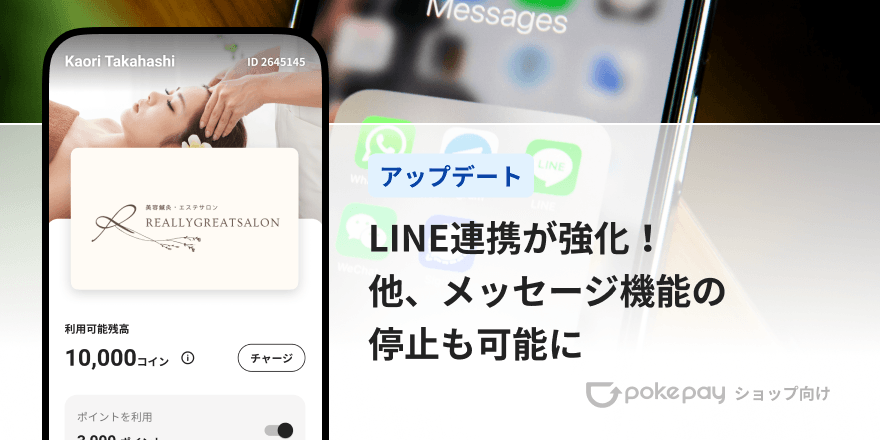
Pokepay(ショップ向け)LINE連携が強化され、メッセージ機能の停止もできるように

この記事ではPokepay(ショップ向け)の機能アップデートについてご紹介します。

copy link Icon

Pokepayをご利用いただいている皆さまに、さらに便利にご利用いただけるよう、いくつかの機能をアップデートいたしました。ぜひご確認ください!

Pokepay (ショップ向け) のダウンロードがまだの方はこちら。

まずはLINE連携の強化です。

既にお店のLINEのリッチメニューからPokepayを起動できるようにしている店舗様、これからLINEと連携したいと考えている店舗様が対象となります。

今回のアップデートにより、LINEのリッチメニュー等からLINEブラウザでお店のオリジナルPayを起動することができるようになりました。
LINEログインを有効にすることで、新規登録やログインもそのままLINE内で完了することができます。

これまで、LINEのリッチメニューに登録していただくURLは、外部ブラウザで開くパラメータの入った専用のものとなっておりましたが、以降は通常のオリジナルPayアプリを開くリンクに変更できます。
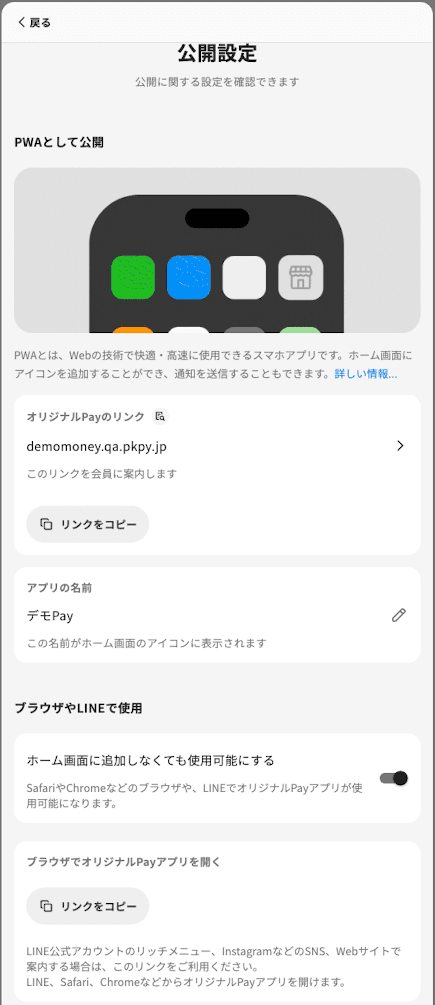
登録用のリンクは、「ホーム」>「広める」>「公開設定」>「ブラウザやLINEで使用」をオンにしていただくと、コピーが可能です。
Pokepay(ショップ向け)LINE連携が強化され、メッセージ機能の停止もできるように

LINE上で起動させたい店舗様は、リッチメニューのURLを上記のものへ差し替えてください。

これから利用される方は、以下の点にご注意ください。

  1. LINE上でアプリを使う場合、iOSではプッシュ通知が動作しません。
  2. ホーム画面に追加したアプリとのログイン状態は共有されないため、再度ログインが必要になります。
  3. 新たにLINEログインを有効にした場合、以前にメール等でログイン済みのお客様は、一度以前の方法でログインしてからLINEアカウントを紐づけてください。登録されているメールが異なる場合、別アカウントととして登録されてしまうためです。
  4. 一部Android機種は、LINE上でのカメラ起動ができず、QRを読み取っての支払いができません。お客様のQRを店舗が読み取って、支払いを受け付けてください。

LINEからオリジナルPayが起動できればと、お考えの店舗様は、ぜひこの機会に活用をご検討ください。

メッセージ機能の停止が可能に

「既にお客様とは連絡する手段があるので、連絡経路が増えると管理の手間が…」
「メッセージで予約などを一方的に連絡されてしまう…」

そのようなお声にお応えして、メッセージ機能を停止できるようになりました。
機能をオフにすると、会員からは全体向けの「お知らせ」と有効期限に関する通知のみが見えるようになります。

設定方法

メッセージ機能のオフは会員設定より設定できます。

➀ナビゲーションバーの「メニュー」をタップ

②設定セクションの「会員設定」をタップ
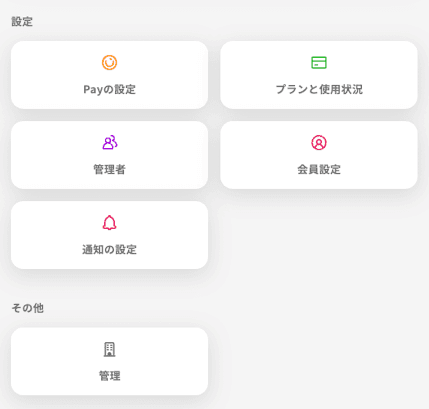
Pokepay(ショップ向け)LINE連携が強化され、メッセージ機能の停止もできるように

③会員とのメッセージをタップ


これから利用される方は、以下の点にご注意ください。

  1. メッセージでの支払い依頼は利用できなくなります。
  2. ポイント付与時に追加したメッセージは、取引履歴からのみ確認可能です。

先にご案内したLINE上でのオリジナルPayを利用される場合、メッセージ機能をオフにすることで、会員とのやり取りはこれまで通りLINEで、といった運用が可能になります。

その他アップデート

  • ギフト機能についての説明がより詳細になりました。
  • 会員アプリが軽量化し、起動が以前よりも早くなりました。
  • 幅の広い端末での表示を最適化しました。

ご利用にあたってのご質問や、自店舗での活用方法のご相談などもいつでも受け付けておりますので、ご気軽にアプリよりご連絡ください。
本機能を活用し、貴社のビジネスをさらに活性化させていきましょう。

facebook Icon

Tags

#コラム
#新機能
#活用方法
facebook Icon

Share this article

copy link Icon